
Writing tests
Turn a player-visible behavior into a small, repeatable test.
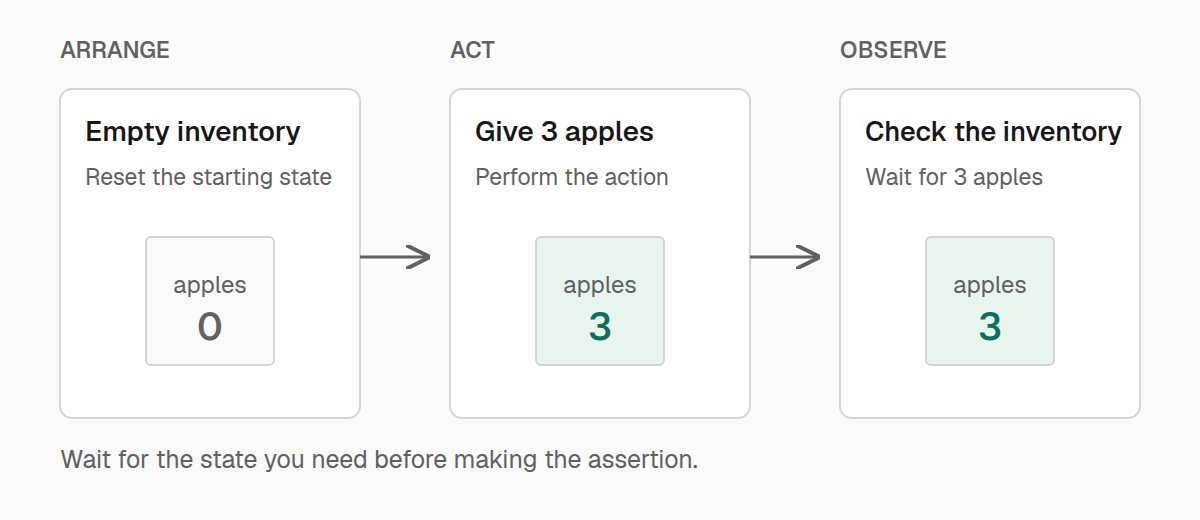
A useful test tells a short story: put the game in a known state, perform one action, and check what changed. Name it after that behavior so a failure tells you what stopped working.
If you have not run a test yet, start with Getting started. The examples below belong in .test.ts files under your test directory.
Write one complete test
This test starts with an empty inventory, gives the player three apples, and checks that they arrived:
import { expect, test } from "@teakit/test";

test("giving apples adds them to the inventory", async ({ player }) => {
  await player.reset({ inventory: "clear" });
  await player.give("minecraft:apple", 3);

  await player.inventory().waitForItem("minecraft:apple", { count: 3 });
  await expect(player.inventory()).toContainItem("minecraft:apple", { count: 3 });
});
The callback receives the parts of TeaKit you need. Here, player controls and observes the test player. Other guides introduce world, client, recipes, and the rest as you use them.
Keep the await on game actions and asynchronous assertions. Otherwise, the test can finish while an action is still running. An inventory matcher reads the inventory asynchronously; a matcher on an ordinary number or string runs immediately.
Share setup without sharing leftovers
Use describe to group related behaviors, and beforeEach to establish their starting state. Each test should still pass when run alone.
import { beforeEach, describe, expect, test } from "@teakit/test";

describe("inventory rewards", () => {
  beforeEach(async ({ player }) => {
    await player.reset({
      gameMode: "survival",
      health: 20,
      food: 20,
      effects: "clear",
      inventory: "clear",
    });
  });

  test("gives an apple", async ({ player }) => {
    await player.give("minecraft:apple");
    await expect(player.inventory()).toContainItem("minecraft:apple");
  });

  test("gives three carrots", async ({ player }) => {
    await player.give("minecraft:carrot", 3);
    await expect(player.inventory()).toContainItem("minecraft:carrot", { count: 3 });
  });
});
Use afterEach for cleanup that must happen even when a test fails. For example, close a menu or clear the small area your test changed. beforeAll and afterAll run once for a suite; reserve them for setup that every test can safely share. Building a mutable inventory once and relying on the order of later tests makes failures difficult to reproduce.
TeaKit releases held inputs and cleans up its active handles between attempts. It does not restore every block, item, or entity you changed. The world guide shows explicit cleanup.
Wait for a result
Some actions finish before their effects become observable. A dropped item can take a tick to appear, and a screen can take a frame to open. Wait for the condition you care about instead of guessing how long to sleep.
For inventory changes, use waitForItem or waitForItemAbsent. For another value, pass a function to an eventual assertion:
import { expect, pos, test } from "@teakit/test";

test("a powered lamp lights up", async ({ world }) => {
  const lamp = pos(0, 100, 0);
  await world.setBlock(lamp, "minecraft:redstone_lamp");

  try {
    await world.setBlock(lamp.below(), "minecraft:redstone_block");

    await expect(async () => (await world.block(lamp)).properties?.lit)
      .toEventuallyEqual("true", { timeout: "5s", interval: "100ms" });
  } finally {
    await world.clear(lamp.below(), lamp);
  }
});
The function reads a fresh block state on each attempt. Passing world.block(lamp) instead would create one promise and keep checking its original result. Block properties returned by Minecraft are strings, so this example compares with "true".
Keep a short timeout on the observation and a larger timeout on the whole test. A failure should name the condition that did not happen, rather than spending all its time waiting.
Declare what a test needs
Set common requirements with describe.configure. This inventory suite needs a world and player, and uses the inventory operations below:
import { Capability, Readiness, describe, expect, test } from "@teakit/test";

describe("inventory", () => {
  describe.configure({
    readiness: [Readiness.World, Readiness.Player],
    capabilities: [
      Capability.PlayerReset,
      Capability.PlayerGive,
      Capability.PlayerInventory,
    ],
    timeout: "30s",
    tags: ["inventory"],
  });

  test("receives its starting tool", async ({ player }) => {
    await player.reset({ inventory: "clear" });
    await player.give("minecraft:iron_pickaxe");
    await expect(player.inventory()).toContainItem("minecraft:iron_pickaxe");
  });
});
Readiness describes the starting state; capabilities describe the operations the test requires. Missing requirements fail before the test body runs. They do not create a world or connect a player for you, so select a suitable session when running tests.
You can put the same options on an individual test. A numeric timeout is in milliseconds; strings such as "30s" are easier to read. The test timeout covers its body, so keep setup and cleanup bounded too.
For an integration that only makes sense with another mod installed, use target: { mods: "examplemod" }. TeaKit skips that test when the mod is absent. An array requires every listed mod. Use runtime.mods.isLoaded("examplemod") inside a test only when both branches still test something useful.
Repeat a behavior with different inputs
A table is useful when the setup and expectation stay the same. Give each row a readable name so failures identify the input:
import { expect, test, type ItemId } from "@teakit/test";

const rewards: { item: ItemId; count: number }[] = [
  { item: "minecraft:apple", count: 1 },
  { item: "minecraft:carrot", count: 3 },
];

test.each(rewards)("gives $count of $item", async (reward, { player }) => {
  await player.reset({ inventory: "clear" });
  await player.give(reward.item, reward.count);
  await expect(player.inventory()).toContainItem(reward.item, { count: reward.count });
});
Use test.only while working on one failure, and remove it before sharing the suite. test.skip keeps a test visible without executing it; test.todo records a behavior you have not implemented yet.
Keep failures useful
Check the smallest observable result that proves the behavior. For a recipe, inspect the resulting item; for movement, check the final position; for an interaction, check the changed block, entity, or screen.
Retries repeat a failed test attempt and its per-test hooks. They can help investigate an intermittent failure, but they do not fix a missing wait or restore the world for you. Prefer a fresh fixture and an explicit observation. When a failure needs more context, attach the relevant state or a screenshot to the report.