
Multiplayer tests
Send an action from a real client, check the dedicated server, and confirm that the result reaches the player.
A singleplayer test can miss a feature that only works because client and server share a process. Run a paired test when you need to check a dedicated server: one TeaKit test drives a client and observes the server it has joined.
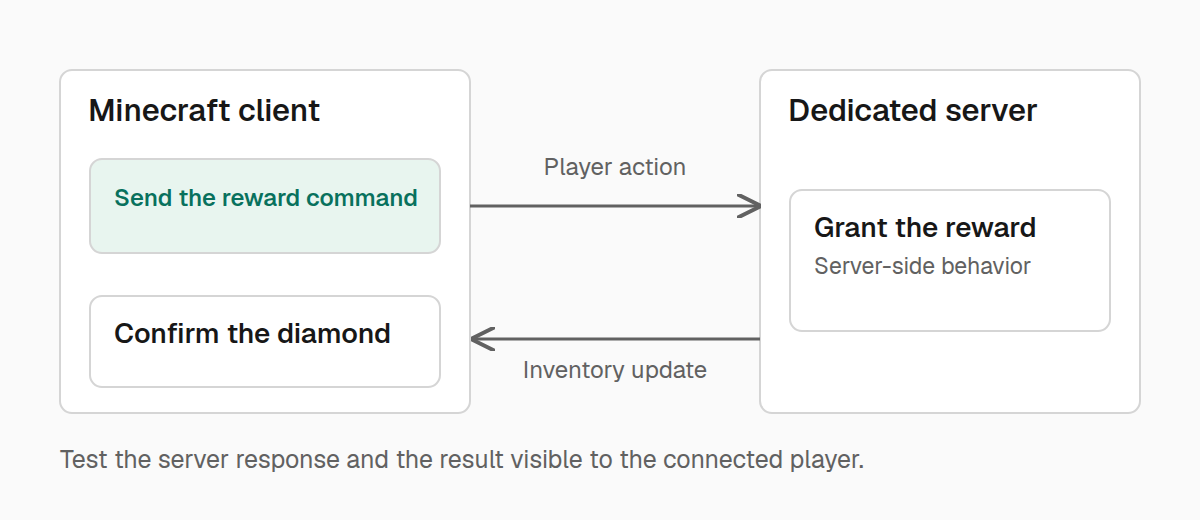
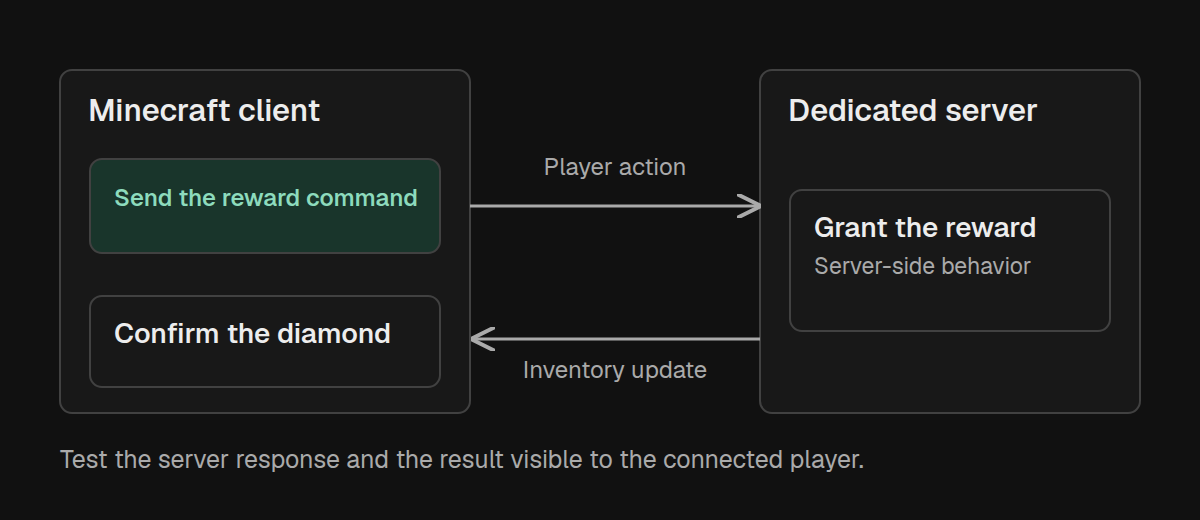
A useful multiplayer test follows the whole action. Send the request from the client, check the server's result, then check that the client received the update.
Prepare two development runs
Install your mod and TeaKit's runtime in both the development client and dedicated server. Give them separate game directories, such as run-client and run-server, so their saves, logs, and TeaKit connection files stay separate.
Use your loader's development run configurations to start both processes. The client can remain at the title screen; wait until the server has finished starting. Each running instance writes a teakit/instance.json file inside its own game directory.
Both runs must use the Minecraft version and loader of the node you select. When configuring these runs yourself, supply their matching teakit.minecraftVersion and teakit.loader JVM properties so TeaKit can identify them. The launch configuration guide explains node names and development launch settings.
Keep these connection files local. They contain credentials for controlling that game instance and should not be committed or attached to a bug report.
Connect the pair
Choose the node from ./teakitw nodes, then run:
./teakitw pair \
  --node "$TEAKIT_NODE" \
  --client-instance run-client/teakit/instance.json \
  --server-instance run-server/teakit/instance.json \
  --server-address 127.0.0.1:25565 \
  --test-file test/teakit/reward.test.ts
Set TEAKIT_NODE to the selected node name before running this command. Adjust the game directories and server address to match your development runs.
This command uses the two running instances. It connects the client to the given server and waits for the server to see a player before starting the test. It shuts down both instances when the test finishes, including when the test fails. Use a dedicated pair of test runs.
Follow a reward from request to result
Suppose your mod has an examplemod reward command that grants the calling player one diamond. The test below clears the inventory first, sends the command from the client, and checks both sides of the result. Replace the command and reward with your own feature.
import { expect, test } from "@teakit/test";

test("the reward reaches the requesting player", async ({
  session, player, client, server, artifacts,
}) => {
  expect((await session.info()).paired).toBe(true);
  await player.reset({ gameMode: "survival", inventory: "clear" });
  await client.closeMenus();

  await client.command("examplemod reward");

  await expect(async () => {
    const count = await server.command("clear @a minecraft:diamond 0");
    return count.result;
  }).toEventuallyEqual(1, { timeout: "5s" });

  await client.openInventory();
  await expect(async () => {
    const screen = await client.screen();
    return screen.menu().slots().some(
      (slot) => slot.item?.itemId === "minecraft:diamond",
    );
  }).toEventuallyEqual(true, { timeout: "5s" });

  await artifacts.attachScreenshot(await client.screenshot("received-reward"));
  await client.closeMenus();
});
clear @a minecraft:diamond 0 counts matching items on the server without removing any. With one player and an initially empty inventory, the expected count is exactly one. client.screen() reads the client's open menu. Checking both distinguishes “the server never granted the reward” from “the server granted it, but the client did not receive it.”
client.command() travels through the player's client command path. Calling server.command() instead would run from the server console and would not exercise the player's request. Use server commands for setup when appropriate, then perform the action under test through the client.
Keep one player in this test server. The player helpers operate on the runtime's primary player; this example does not choose among several connected players.
Know which side you are reading
In a paired test, client and render inspect the client, while world and server operate on the dedicated server. Use server.command() for a server-side inventory check as shown above; use the client menu to inspect what the player sees. Client-driven movement tasks still run through the client.
To check whether an optional integration is installed on a particular side, call runtime.mods.isLoaded("othermod", { side: "client" }) or use side: "server". A client-only integration may be absent from the server without anything being wrong.
Use session.client.health() and session.server.health() when a failure depends on whether one side finished connecting. Attach only the fields needed to explain the failure, rather than the complete connection metadata.
Read a failed pair run
The pair command writes its report under build/teakit/<node>/<test-file>.pair/summary.json. Start with the failed assertion, then look at the attachments and each game's log.
If the command never reaches your test, check that both connection files belong to currently running instances and that the server address is reachable from the client. If server state changes but the menu assertion times out, investigate the update sent back to the client.
See Diagnosing failures for attaching the state that explains a failure without hiding the original assertion.