
Preparing a world
Build a small test area, control its conditions, and leave it ready for the next test.
A test should not depend on finding the right tree, waiting for daylight, or remembering what a previous test built. Create the few blocks your behavior needs at a known position. Use a disposable test world: these operations change it directly.
Build a small platform
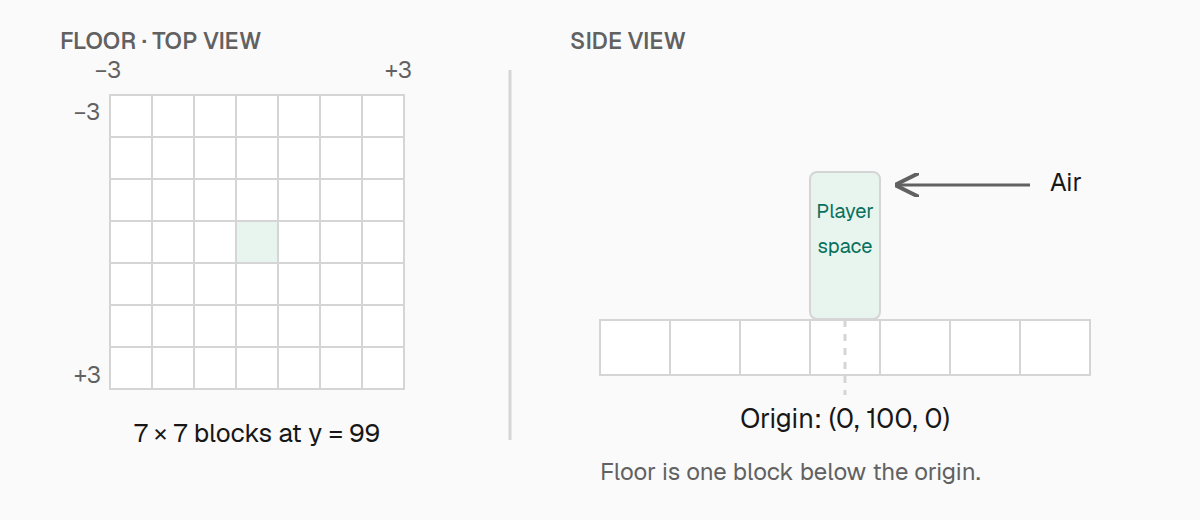
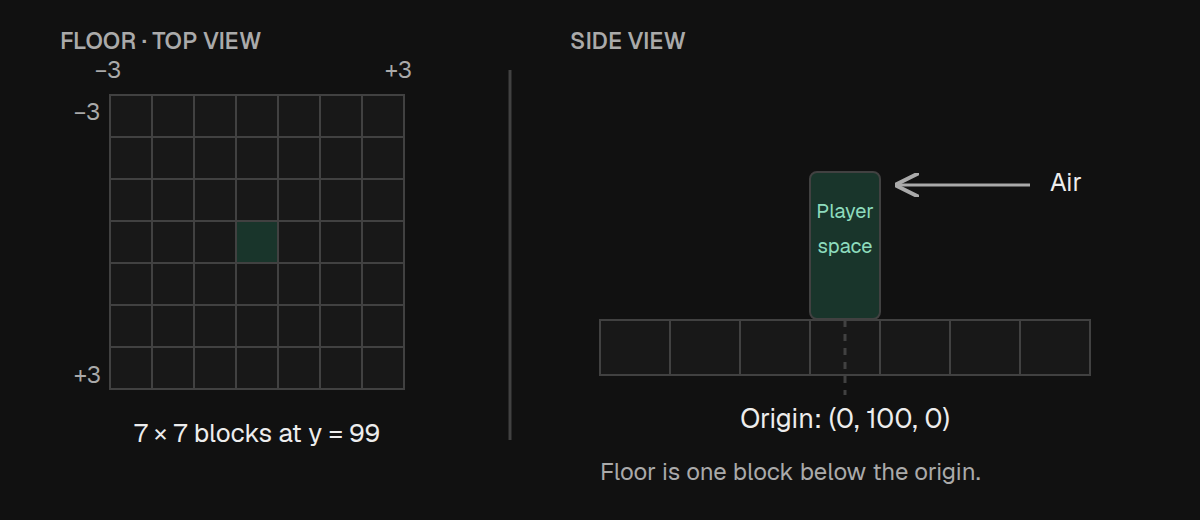
Choose an origin for the player's feet. Put the floor one block below it, then clear enough space to stand and move:
import { expect, pos, test } from "@teakit/test";

test("starts on a clear stone platform", async ({ player, world }) => {
  const origin = pos(0, 100, 0);
  await world.fill(origin.offset(-3, -1, -3), origin.offset(3, -1, 3), "minecraft:stone");
  await world.clear(origin.offset(-3, 0, -3), origin.offset(3, 4, 3));
  await player.teleport({ x: 0.5, y: 100, z: 0.5 });

  expect(await world.block(origin.below())).toHaveId("minecraft:stone");
  expect(await world.block(origin)).toHaveId("minecraft:air");
});
fill and clear include both corners. From −3 through 3 is seven blocks, so this floor is 7 × 7. pos creates a position with helpers such as above, below, and offset; these return new positions without changing the original.
A block position identifies a block. A player's position describes their feet and can use fractions. Putting the player at X and Z plus 0.5 centers them on the block.
Reuse a named fixture
When several tests need the same platform, give the setup a name with world.fixture. Nothing is placed until you call build:
import { beforeEach, describe, expect, pos, test } from "@teakit/test";

const origin = pos(0, 100, 0);

describe("blocks on a platform", () => {
  beforeEach(async ({ world }) => {
    await world.clear(origin.offset(-3, 0, -3), origin.offset(3, 4, 3));
    await world.fixture("examplemod:block-tests")
      .origin(origin)
      .platform({ block: "minecraft:stone", size: 7 })
      .build();
  });

  test("places a chest above the floor", async ({ world }) => {
    await world.setBlock(origin, "minecraft:chest");
    expect(await world.block(origin)).toHaveId("minecraft:chest");
  });
});
The platform is centered under the origin. Use an odd size when you want equal room on each side. The builder also has clearVolume({ dx, dy, dz }); that volume starts at the origin and grows in the positive directions. It is not centered like the platform, which is why this example clears explicit corners.
Keep fixtures small. A furnace test usually needs a floor, a furnace, and a player; building an entire room adds more state to reset without testing more of the furnace.
Place the state you need
Pass an ID for a block's default state, or an object when the property matters:
import { expect, pos, test } from "@teakit/test";

test("sets a lever facing north", async ({ world }) => {
  const lever = pos(2, 100, 0);
  await world.setBlock(lever.below(), "minecraft:stone");
  await world.setBlock(lever, {
    id: "minecraft:lever",
    properties: { face: "floor", facing: "north", powered: "false" },
  });

  const state = await world.block(lever);
  expect(state).toHaveId("minecraft:lever");
  expect(state.properties?.facing).toBe("north");
});
setBlock is setup. It does not prove that a player can place that block. Use player interactions when placement or right-click behavior is what you want to test.
For random-tick behavior, world.randomTick(position) asks Minecraft to tick that block once. A single random tick does not guarantee a random outcome such as crop growth. Set the required surroundings and wait for the outcome your test actually promises.
Set time and weather
Set the conditions immediately before a test that depends on them:
import { expect, test } from "@teakit/test";

test("starts with clear weather at noon", async ({ world }) => {
  await world.setTime(6000);
  await world.setWeather({ type: "clear", durationTicks: 1200 });

  expect((await world.weather()).type).toBe("clear");
  expect((await world.time()).dayTime).toBeGreaterThanOrEqual(6000);
});
Setting time does not stop time passing. If a longer test needs a fixed day or weather cycle, configure that rule in your test world and restore it when finished. Avoid an exact time assertion after an asynchronous operation: Minecraft may already have advanced a tick.
Inspect an area
A compact area snapshot is useful when a test changes several nearby blocks. Attach it to the report so you can inspect the state after a failure:
import { expect, pos, test } from "@teakit/test";

test("places glass in the test area", async ({ artifacts, world }) => {
  const origin = pos(0, 100, 0);
  await world.setBlock(origin, "minecraft:glass");

  try {
    expect(await world.block(origin)).toHaveId("minecraft:glass");
  } finally {
    const area = await world.inspectArea(origin, { radius: 2 });
    await artifacts.attachJson("glass-test-area", area);
  }
});
The inspection includes non-air blocks and entities around the origin. Use world.container(position).inspect() separately when you need container contents. These snapshots record state for diagnosis; they are not saved worlds that you can restore. See Diagnostics for screenshots and other attachments.
Clean up the area you changed
Rebuild your starting state before each test and clear your own changes afterward. afterEach still runs when the test fails:
import { afterEach, beforeEach, expect, pos, test } from "@teakit/test";

const origin = pos(0, 100, 0);
const from = origin.offset(-3, 0, -3);
const to = origin.offset(3, 4, 3);

beforeEach(async ({ world }) => {
  await world.clear(from, to);
  await world.fill(from.below(), pos(to.x, origin.y - 1, to.z), "minecraft:stone");
});

afterEach(async ({ world }) => {
  await world.clear(from, to);
});

test("places its own crafting table", async ({ world }) => {
  await world.setBlock(origin, "minecraft:crafting_table");
  expect(await world.block(origin)).toHaveId("minecraft:crafting_table");
});
Clearing blocks does not remove entities. Remove the entities you spawned through their handles, or use a bounded entity query as shown in Testing content.
Do not use cleanupNamespace as a world reset. It does not restore blocks or isolate cleanup to a fixture's name. Explicit bounds and entity handles make the cleanup match the setup.