
Run in CI
Check tests early, run Minecraft unattended, and preserve failure evidence.
Get a focused test working in a visible client before moving it into CI. The same suite can then run unattended, with the logs and screenshots saved for anyone investigating a failure.
For GitHub Actions, use setup-teakit. It prepares an Ubuntu x64 runner with a Temurin JDK, Gradle caching, Xvfb, and Minecraft's native graphics libraries. It also checks that software OpenGL works before your tests start.
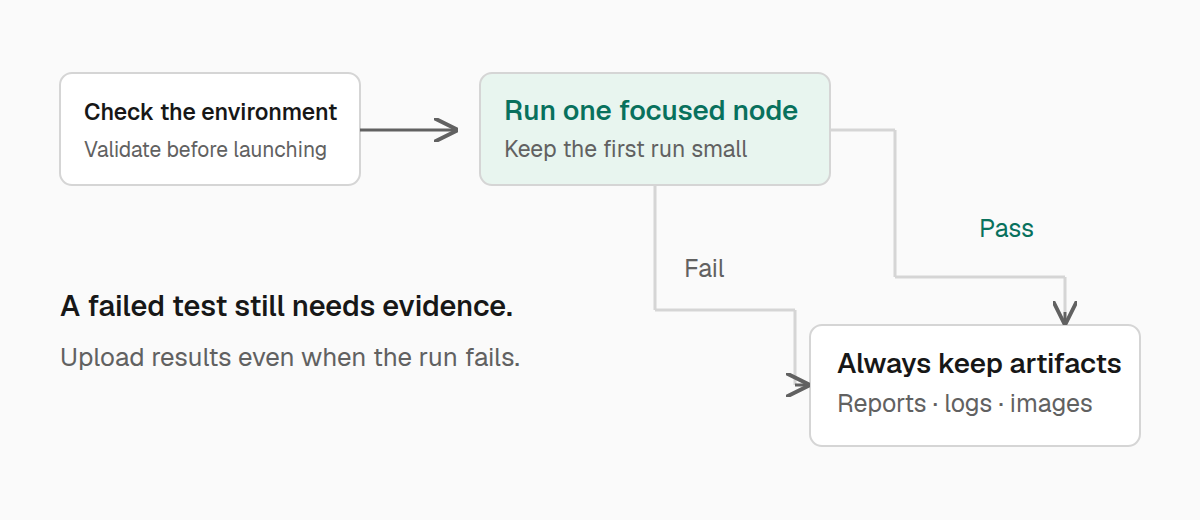
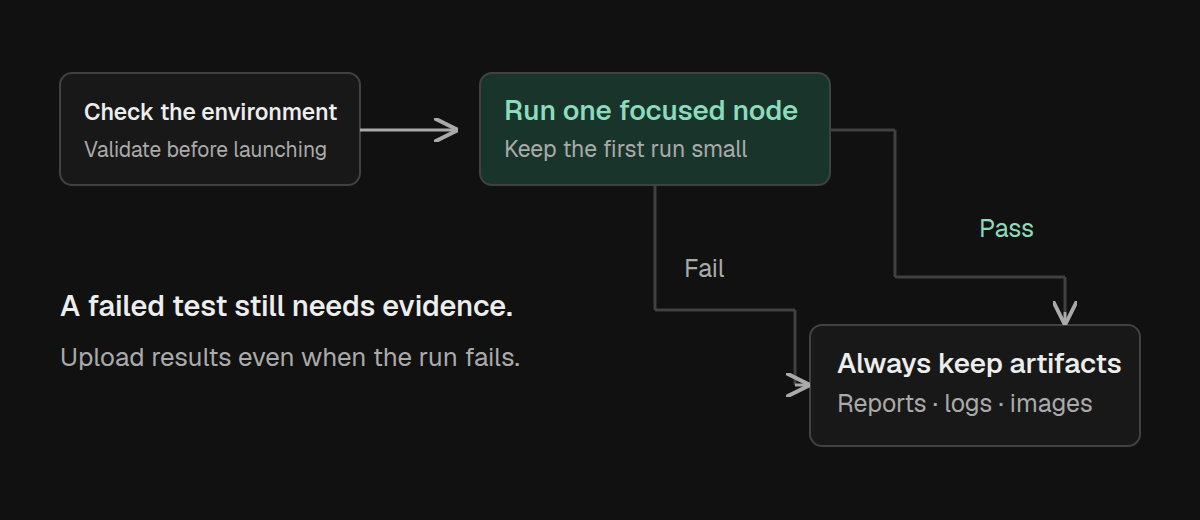
Check before launching
Run the setup and TypeScript checks first:
./gradlew teakitDoctor teakitTypecheckThese checks catch missing configuration, unresolved test imports, and many incorrect API calls without waiting for Minecraft to start. They do not prove gameplay behavior; keep the Minecraft test step too.
Use the JDK required by your mod project, and make sure the CI checkout can launch the same development client you run locally.
Run without a desktop window
Enable background mode for the Minecraft test step:
./gradlew teakitCheck -Pteakit.node=YOUR_NODE -Pteakit.background=trueReplace YOUR_NODE with a name from ./teakitw nodes. TeaKit provides the temporary display, keeps the Minecraft process supervised, and closes the display when the run ends. You do not need to wrap the command in xvfb-run.
setup-teakit installs the display and graphics dependencies on GitHub Actions. On another Linux CI service, install Xvfb, Mesa software OpenGL, and Minecraft's native libraries yourself.
Background mode is Linux-only. Windows and macOS can run visible development clients. If Xvfb is installed outside PATH, set TEAKIT_XVFB to the executable's absolute path.
Run on GitHub Actions
Ask for a summary at a predictable location:
./gradlew teakitCheck -Pteakit.node=YOUR_NODE -Pteakit.background=true -Pteakit.timeout=240 -Pteakit.report=build/teakit/ci-summary.jsonUpload build/teakit even when the test command fails. This directory contains run summaries, launch logs, and attachments that explain what happened. Exclude instance.json, which contains local connection credentials. If you place the report elsewhere, include that location too.
Use setup-teakit in place of separate Java, Gradle, and graphics setup steps. Your project must already have the TeaKit plugin, development runtime, and tests configured; the action prepares the runner and your Gradle tasks run the tests.
This workflow reads the selected node from a repository variable named TEAKIT_NODE:
name: Minecraft tests
on: [push, pull_request]
permissions:
  contents: read

jobs:
  tests:
    runs-on: ubuntu-latest
    timeout-minutes: 20
    steps:
      - uses: actions/checkout@v7
      - uses: iamkaf/setup-teakit@v1
        with:
          java-version: '25'
      - name: Check the tests
        run: ./gradlew teakitDoctor teakitTypecheck
      - name: Run Minecraft tests
        env:
          TEAKIT_NODE: ${{ vars.TEAKIT_NODE }}
        run: |
          test -n "$TEAKIT_NODE"
          ./gradlew teakitCheck "-Pteakit.node=$TEAKIT_NODE" -Pteakit.background=true -Pteakit.report=build/teakit/ci-summary.json
      - name: Upload test results
        if: always()
        uses: actions/upload-artifact@v7
        with:
          name: teakit-results
          path: |
            build/teakit
            !build/teakit/**/instance.json
          if-no-files-found: ignore
Set TEAKIT_NODE to a node in your project and set java-version to the JDK your mod build requires. Keep any dependency caches or environment setup your existing build needs. The workflow is a starting point for a Linux runner, not a replacement for your project's build configuration.
The action uses read-only Gradle caches on pull requests by default. Set its cache-read-only input if you need to override that policy. See setup-teakit and the artifact upload action for their configuration options.
For several loaders, use one matrix job per node with fail-fast: false and distinct artifact names. This gives you independent results and lets jobs run in parallel.
Keep checks reproducible
Commit your tests, teakit.toml, and the Gradle configuration that selects TeaKit. If your team checks in the generated wrapper and editor types, keep them together with their tsconfig.json integration.
-Pteakit.noSyncSdk=true leaves managed type files alone during a check. Use it only when those files are already present and current; it does not install a missing SDK.
When investigating a failure, start with the reported test and its attachments. Diagnostics covers evidence inside a test, and troubleshooting covers setup and launch failures.