
The running game
Find installed mods, choose a data directory, and keep client setup on the client.
Some features depend on the game around your mod: an optional integration should run only when its partner is installed, and a settings file needs somewhere to live. Platform gives you those answers without choosing a loader-specific API.
Find an installed mod
Use the mod's ID, rather than its display name:
import com.iamkaf.amber.api.platform.v1.Platform;

if (Platform.isModLoaded("konfig")) {
    // Enable your optional Konfig integration.
}
For several alternatives, isAnyModLoaded(...) succeeds when at least one is present. areAllModsLoaded(...) is useful when an integration needs every listed dependency.
Finding a mod locally does not establish whether a remote multiplayer client has it. Use network peer availability for that.
If you need a name or version to show in a report, ask for its metadata:
import com.iamkaf.amber.api.platform.v1.Platform;

var info = Platform.getModInfo("amber");
if (info != null) {
    String label = info.name() + " " + info.version();
}
The returned ModInfo also has id() and description(). getModName(id) and getModVersion(id) are shortcuts when you need only one field. These queries return null for a missing mod, so handle that case before reading the result. getModIds() gives you the loaded IDs when you need to list them.
Choose a directory
Use the loader's configuration directory for your mod's settings:
import com.iamkaf.amber.api.platform.v1.Platform;
import java.nio.file.Files;

var directory = Platform.getConfigFolder().resolve("example");
Files.createDirectories(directory);
var settingsFile = directory.resolve("settings.json");
This is ordinary Java file handling; let your setup code report an IOException if the directory cannot be created. Amber returns paths but does not create files or directories for you. If you want configuration loading, saving, and a settings screen together, see Konfig.
getGameFolder() is the base game directory. For familiar subfolders, use getModsFolder(), getLogsFolder(), getScreenshotsFolder(), getResourcePacksFolder(), or getShaderPacksFolder() instead of assembling those paths yourself.
getSavesFolder() points at the single-player saves folder. To save data in the currently running world, use that world's storage APIs instead: a dedicated server's world can live somewhere else.
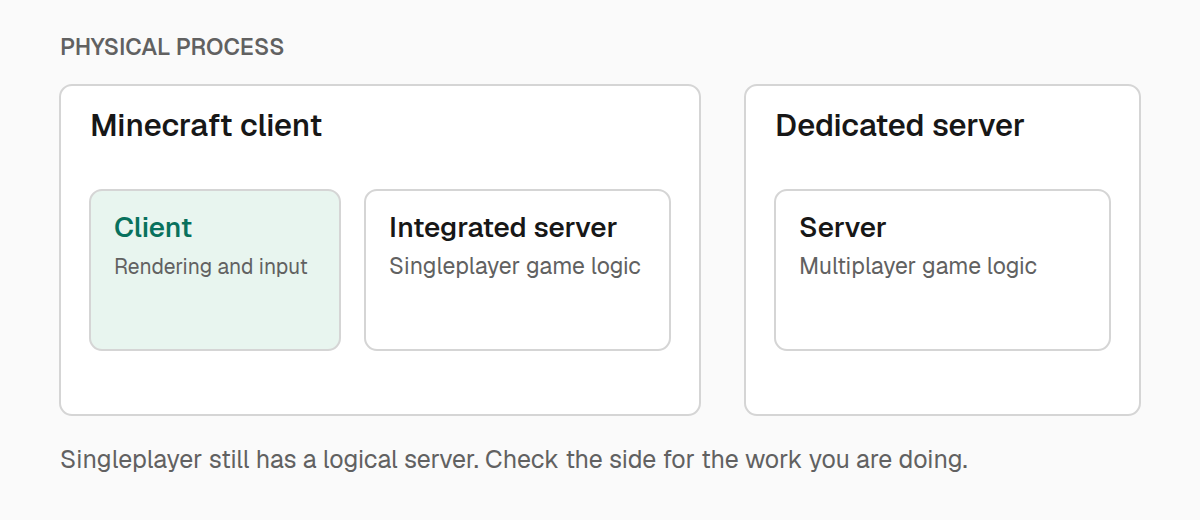
Understand which side you're on
A Minecraft client can also host an integrated server. That gives you two different questions:
- Which process is this?
Platform.isClient()andPlatform.isServer()distinguish a client launch from a dedicated server. - Who owns this gameplay action? Use the world or player supplied to your callback to distinguish client prediction from server gameplay.
A client process remains a client process while hosting single-player. Testing Platform.isServer() before granting a reward would therefore skip single-player entirely. Run gameplay changes from a server event, or check the event's logical side.
To run client setup from a shared entrypoint, EnvExecutor delays access to the client class until it has checked the side:
import com.iamkaf.amber.util.Env;
import com.iamkaf.amber.util.EnvExecutor;

EnvExecutor.runInEnv(Env.CLIENT, () -> ExampleClient::initialize);
Use this as an alternative to calling ExampleClient.initialize() from a client entrypoint, not an additional call. The nested supplier keeps the client setup behind the side check. Client-only fields and imports still belong in that separate class.
getInEnv follows the same pattern when the work returns a value: its result is an Optional, empty on the other side. getEnvSpecific chooses between a client supplier and a server supplier. These helpers run immediately on the calling thread; they do not schedule work.
Add context to a diagnostic
getPlatformName() returns the running loader's name, and isDevelopmentEnvironment() tells you whether this is a development launch. Both are useful in a Doctor report.
Most gameplay can stay independent of the loader. When an integration really needs a loader-specific choice, isFabric(), isForge(), and isNeoForge() make that choice explicit. getPlatform() is an alias for getPlatformName(), while getEnvironment() returns the Env value behind the side checks.