
Events
React to players joining, protect farmland, change rewards, and let other mods listen to your own actions.
An event is a place where your mod can respond to something happening in the game. For example, you can welcome a player when they join, stop farmland from being trampled, or add an item to a fishing catch.
Amber provides these hooks through the same API on Fabric, Forge, and NeoForge. You register a listener once, and Amber calls it whenever the event happens.
Welcome a player
Add this listener to your mod's common initialization method:
import com.iamkaf.amber.api.event.v1.events.common.PlayerEvents;
import com.iamkaf.amber.api.functions.v1.PlayerFunctions;
import net.minecraft.network.chat.Component;

PlayerEvents.PLAYER_JOIN.register(player -> {
    PlayerFunctions.sendMessage(player, Component.literal("Welcome!"));
});
PLAYER_JOIN runs on the server after the player logs in. The listener receives that player, so you can send a message without looking them up. Each future login calls the same listener.
Other player events follow this pattern. Use PLAYER_LEAVE to clean up a player's temporary state, or PLAYER_RESPAWN to transfer state to their replacement player entity. The respawn listener receives the old player, the new player, and an alive flag: false means they died; true means an alive transition such as returning from the End.
Register listeners during initialization, rather than each time a world opens or a player joins. Amber does not expose an unregister operation, and registering the same code twice makes it run twice. If a feature can be disabled, check its current configuration inside the listener.
Protect farmland
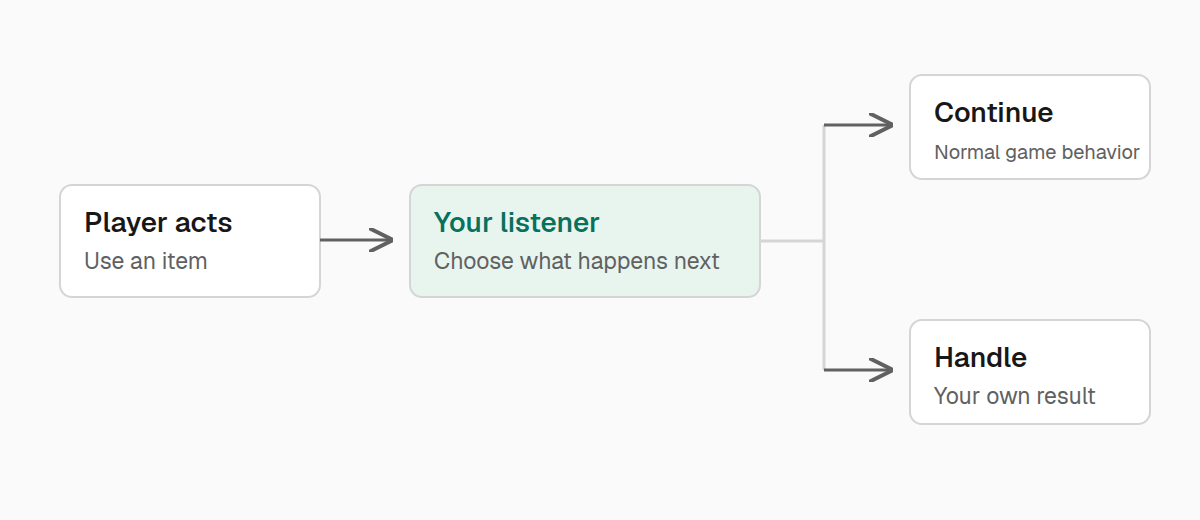
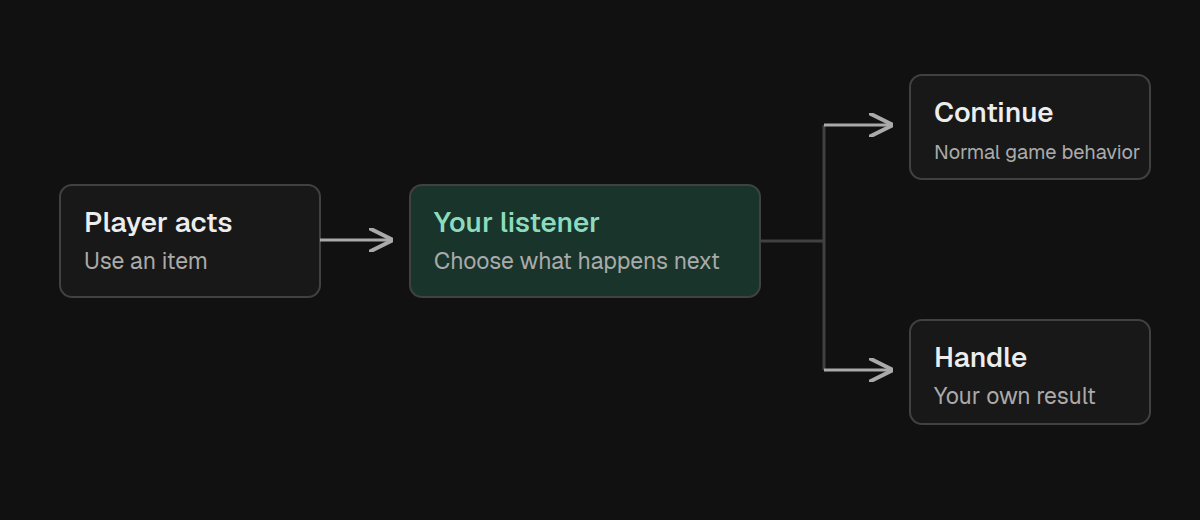
Some events let you stop the action that caused them. To keep farmland from turning into dirt when something lands on it, return FAIL from FARMLAND_TRAMPLE:
import com.iamkaf.amber.api.event.v1.events.common.FarmingEvents;
import net.minecraft.world.InteractionResult;

FarmingEvents.FARMLAND_TRAMPLE.register(
        (level, pos, state, fallDistance, entity) -> InteractionResult.FAIL
);
The parameters tell you where the action happened and which entity caused it. You can use them to narrow the rule. This listener protects farmland from players while allowing other entities to trample it:
import net.minecraft.world.entity.player.Player;

FarmingEvents.FARMLAND_TRAMPLE.register(
        (level, pos, state, fallDistance, entity) -> {
            if (entity instanceof Player) {
                return InteractionResult.FAIL;
            }
            return InteractionResult.PASS;
        }
);
Use one of these listeners, depending on the behavior you want.
PASS means your listener leaves the action alone. Amber continues to other listeners, then lets Minecraft handle it if none intervene. Any other result stops the remaining listeners. In this event, it also prevents trampling.
For right-click interactions, SUCCESS means you handled the interaction yourself. It does not mean “let Minecraft continue.” Your listener must perform its custom action before returning success; returning a result does not grant rewards or consume items on its own.
The same distinction helps when choosing a hook. BlockEvents.BLOCK_BREAK_BEFORE can prevent a block from breaking, while BLOCK_BREAK_AFTER tells you a break already happened. An after-event that returns void cannot undo the action.
Change a fishing catch
Some events change an output instead of returning a result. FishingEvents.MODIFY_CATCH gives you a mutable list of drops before the catch is delivered. Add, remove, or replace stacks in that list:
import com.iamkaf.amber.api.event.v1.events.common.FishingEvents;
import net.minecraft.world.item.ItemStack;
import net.minecraft.world.item.Items;

FishingEvents.MODIFY_CATCH.register((player, hook, rod, drops) -> {
    drops.add(new ItemStack(Items.STICK));
});
This adds a stick to every catch and keeps the original drops. Because the listener returns void, it does not stop other listeners from making their own changes.
For chest and mob loot, LootEvents.MODIFY receives the loot table's identifier and a consumer that accepts additional LootPool.Builder instances. Check the identifier before adding a pool so your change only affects the intended table.
Change creative tab contents
CreativeModeTabEvents.MODIFY_ENTRIES gives you a tab key and an output to add entries to. This example makes the vanilla stick available in the Tools & Utilities tab:
import com.iamkaf.amber.api.event.v1.events.common.CreativeModeTabEvents;
import net.minecraft.core.registries.Registries;
import net.minecraft.resources.Identifier;
import net.minecraft.resources.ResourceKey;

var toolsTab = ResourceKey.create(
        Registries.CREATIVE_MODE_TAB,
        Identifier.fromNamespaceAndPath("minecraft", "tools_and_utilities")
);
CreativeModeTabEvents.MODIFY_ENTRIES.register((tabKey, output) -> {
    if (tabKey.equals(toolsTab)) {
        output.accept(Items.STICK);
    }
});
Check the key before adding anything: this event runs for every tab, and can run again when tab contents refresh. output.accept takes an item or stack; acceptAll takes a collection of stacks. You can also choose whether an entry appears in the parent tab, the search tab, or both.
For a simple addition of your own registered item, the registration guide shows a shorter helper.
Choose the right hook
Most common events live in com.iamkaf.amber.api.event.v1.events.common. Start with the action you need to observe:
- Building and interaction.
BlockEventscovers placement, breaking, right-clicking, and left-clicking blocks. UsePlayerEvents.ENTITY_INTERACTwhen the right-click target is an entity instead. - Combat.
EntityEvent.ENTITY_DAMAGEcan cancel incoming damage.AFTER_DAMAGEobserves an accepted hit,ENTITY_DEATHobserves a death, andPlayerEvents.SHIELD_BLOCKobserves a shield block. After-damage amounts are not necessarily the final health lost after armor and enchantments, and the event can run for fatal hits. - Animals and crops.
AnimalEventscovers taming and breeding.FarmingEventscovers bonemeal use, farmland trampling, and crop growth. A bonemeal callback's actor can be null, so check before treating it as a player. - Items and rewards.
ItemEvents.ITEM_DROPandITEM_PICKUPobserve items entering or leaving a player's inventory through drops and pickups.PlayerEvents.CRAFT_ITEMreceives the crafted stacks, including byproducts. These notifications cannot cancel an action that already happened. - Shearing.
EntityEvent.SHEARprovides a context with the target, shears, drops, success flag, and source. CheckgetPlayer()for null when a dispenser or other non-player source may be involved. Treat the drops as a record of what happened, not as an editable catch list. - Spawning and weather.
EntityEvent.ENTITY_SPAWNruns when an entity is added to the world, including cases beyond natural spawning.WeatherEvents.LIGHTNING_STRIKElets you prevent a strike from affecting an entity.
For item properties that should apply to every new stack, register ItemEvents.MODIFY_DEFAULT_COMPONENTS during initialization and use context.modify(item, builder -> ...). That changes item defaults, unlike modifying the components of one stack in a player's inventory.
The event source contains each callback's parameters and return type.
Work with worlds and ticks
World events receive the server and the affected level. Use WorldEvents.WORLD_LOAD to initialize level-specific state, WORLD_SAVE when it needs saving, and WORLD_UNLOAD to release it. Keep that state associated with the level rather than assuming only one world will exist during the game's lifetime.
For work that belongs to the server's tick loop, register ServerTickEvents.START_SERVER_TICK or END_SERVER_TICK. These callbacks take no arguments:
import com.iamkaf.amber.api.event.v1.events.common.ServerTickEvents;

ServerTickEvents.END_SERVER_TICK.register(() -> {
    // Process work your mod queued during this tick.
});
A tick callback runs frequently. If a task only needs to happen once a second, see Run work every few ticks.
For commands, use CommandEvents.EVENT to register with the supplied dispatcher. The commands guide shows how.
Keep client listeners on the client
HUD, input, and rendering events belong in your client initialization code. They live in com.iamkaf.amber.api.event.v1.events.common.client.
Use HudEvents.RENDER_HUD to draw after the in-world HUD, ClientTickEvents to update client state, and InputEvents.MOUSE_SCROLL_PRE when your feature needs to consume a scroll action. MOUSE_SCROLL_POST observes a completed scroll. RenderEvents.BLOCK_OUTLINE_RENDER lets you draw a replacement selection outline and suppress the original by returning a non-PASS result. The client guide covers HUD text and commands.
A client tick can happen while no world is open. Check for a player and level before using them. For common events that can run on both sides, keep rewards and other gameplay changes on the server so a predicted client action cannot grant them a second time.
Publish an event from your mod
An event is also useful when you want other parts of your mod, or other mods, to react to your own actions. This example grants experience and then announces the reward:
import com.iamkaf.amber.api.event.v1.Event;
import com.iamkaf.amber.api.event.v1.EventFactory;
import com.iamkaf.amber.api.functions.v1.PlayerFunctions;
import net.minecraft.server.level.ServerPlayer;

public final class Rewards {
    public static final Event<RewardGiven> GIVEN = EventFactory.createArrayBacked(
            RewardGiven.class,
            listeners -> (player, points) -> {
                for (RewardGiven listener : listeners) {
                    listener.onReward(player, points);
                }
            }
    );

    public static void give(ServerPlayer player, int points) {
        PlayerFunctions.addExperience(player, points);
        GIVEN.invoker().onReward(player, points);
    }

    @FunctionalInterface
    public interface RewardGiven {
        void onReward(ServerPlayer player, int points);
    }
}
RewardGiven defines what a listener receives. createArrayBacked builds an event whose invoker calls every registered listener. Calling Rewards.give(player, 10) grants the points and then runs those listeners.
A listener can now respond without changing the reward code:
Rewards.GIVEN.register((player, points) -> {
    PlayerFunctions.sendActionBar(
            player, Component.literal("Received " + points + " experience")
    );
});
Your invoker decides how results are combined. To make a cancellable custom event, choose a return type and stop the loop when a listener rejects the action. Call that event before granting the reward, then apply the reward only if the result allows it.
For a result that also carries data, CompoundEventResult<T> separates stopping evaluation from the value returned. pass() continues; interruptTrue(object), interruptFalse(object), and interruptDefault(object) stop with an optional boolean outcome and a payload. Check interruptsFurtherEvaluation() in your listener loop. A missing boolean does not mean evaluation should continue.
Order listeners when necessary
Ordinary listeners register in Event.DEFAULT_PHASE. If consumers need an explicit ordering contract, use register(phase, listener) and addPhaseOrdering(first, second) to put one named phase before another.
For a custom event with established phases, EventFactory.createWithPhases declares their order up front. Include Event.DEFAULT_PHASE exactly once and avoid cyclic dependencies. Separate before/after events are often easier to use when they describe two different moments in an action.