
Items, players, and worlds
Charge for a repair, reward players, find nearby targets, and run occasional work.
Amber's utility functions handle small tasks that come up repeatedly in mods: consuming items, repairing equipment, sending player feedback, and finding nearby entities. They are static methods in com.iamkaf.amber.api.functions.v1.
This guide builds a few common features with them. Run gameplay changes on the server so inventories and rewards stay authoritative.
Charge for a repair
Suppose a repair station should take three emeralds and repair a quarter of the held item's maximum durability. consumeIfAvailable combines the payment check and consumption, so the repair only happens after payment succeeds:
import com.iamkaf.amber.api.functions.v1.ItemFunctions;
import com.iamkaf.amber.api.functions.v1.PlayerFunctions;
import net.minecraft.network.chat.Component;
import net.minecraft.server.level.ServerPlayer;
import net.minecraft.world.item.Items;

public static boolean buyRepair(ServerPlayer player) {
    var heldItem = PlayerFunctions.getMainHandItem(player);
    if (!heldItem.isDamaged()) {
        PlayerFunctions.sendActionBar(player, Component.literal("Nothing to repair"));
        return false;
    }

    if (!ItemFunctions.consumeIfAvailable(player.getInventory(), Items.EMERALD, 3)) {
        PlayerFunctions.sendActionBar(player, Component.literal("Requires 3 emeralds"));
        return false;
    }

    ItemFunctions.repairBy(heldItem, 0.25F);
    PlayerFunctions.sendActionBar(player, Component.literal("Item repaired"));
    return true;
}
repairBy takes a fraction: 0.25F restores 25% of maximum durability, rather than 25% of the current damage. The stack in the player's hand is changed directly.
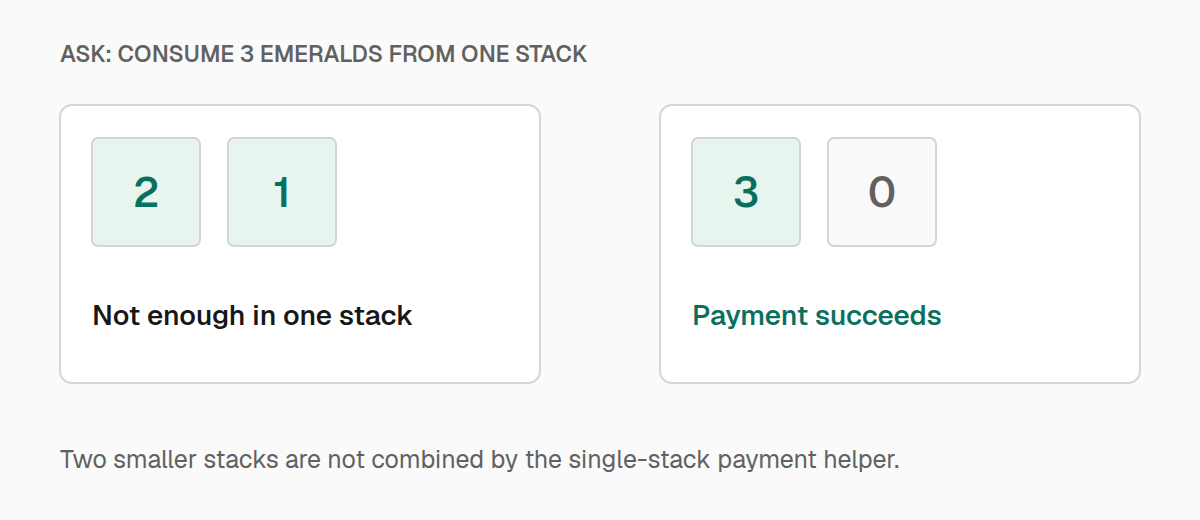
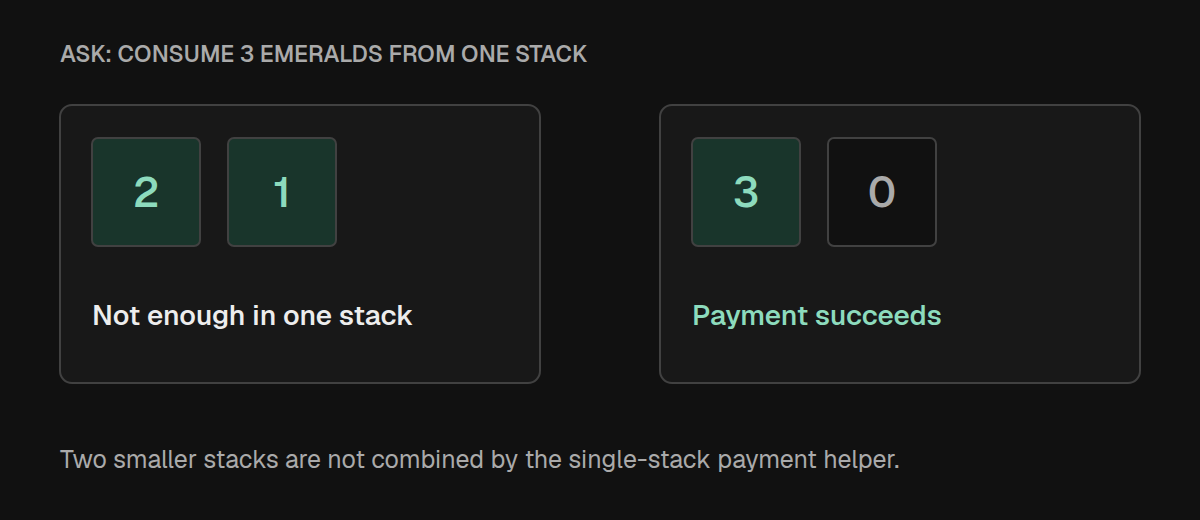
The payment must fit in one stack. Two emeralds in one slot and one in another do not satisfy a request for three. The method returns false without consuming either stack. You can also match an Ingredient or item tag when several items should count as payment.
Use ItemFunctions.has for a presence check that does not consume anything. For an actual payment, use the consume method's result instead of checking and consuming separately.
Work with several slots
ItemFunctions.getArmorSlots(player) gives you head, chest, legs, and feet, in that order. For example, a reward could repair every worn piece:
for (var armor : ItemFunctions.getArmorSlots(player)) {
    if (armor.isDamaged()) {
        ItemFunctions.repairBy(armor, 0.1F);
    }
}
For the full inventory, ItemFunctions.forEach visits every slot, including empty ones. getInventoryItems returns a separate list that still contains the original stack references. Copy the stacks if you need a snapshot that will remain unchanged while the inventory is edited.
PlayerFunctions also provides access to the offhand, individual armor slots, hotbar slots, and ender chest. Hotbar indexes run from 0 to 8; ender chest indexes run from 0 to 26.
Respond to the player's equipment
You might give a mining reward only when the player is holding a tool, or increase it when that tool has Fortune. These checks work on the actual stack:
import net.minecraft.resources.Identifier;

var heldItem = PlayerFunctions.getMainHandItem(player);
if (ItemFunctions.isTool(heldItem)) {
    int fortune = ItemFunctions.getEnchantmentLevel(
            heldItem, Identifier.fromNamespaceAndPath("minecraft", "fortune")
    );
    PlayerFunctions.addExperience(player, 1 + fortune);
}
An absent enchantment has level 0. Use containsEnchantment when only its presence matters. isWeapon and isArmor offer similar classification checks; the armor check includes all equippable items, so it is broader than protective armor.
For equipment that grants an attribute bonus, ItemFunctions.addModifier preserves the item's defaults while adding your modifier. Give the modifier a stable identifier so applying the same upgrade replaces its previous value. The attribute and identifier together determine which modifier is replaced.
When defining repair materials, createRepairIngredient accepts an item supplier and produces an ingredient supplier. The nested VanillaArmorToughness, VanillaKnockbackResistance, and VanillaEnchantability enums provide reference values when defining material properties. See the item utilities source for these helpers.
Give feedback and rewards
Use the action bar for short feedback about an action, chat for messages the player may want to read later, and a title for a major milestone. Here, completing a quest grants experience and displays a title:
PlayerFunctions.addExperience(player, 25);
PlayerFunctions.sendTitle(
        player,
        Component.literal("Quest complete"),
        Component.literal("The village is safe"),
        10, 50, 10
);
The last three arguments are fade-in, stay, and fade-out times in ticks. Omitting them uses 20, 60, and 20. Use clearTitle to remove an existing title; passing null for one title component simply leaves that component unchanged.
For a chat message, call sendMessage(player, component). For a sound heard only by that player, call playSound(player, sound). Titles and player-directed sounds require a server player. Use WorldFunctions.playSoundAt when the sound belongs at a position in the world and nearby players should hear it.
Experience points and levels are different rewards: addExperience adds points, while addLevels adds whole levels. You can read the player's level and progress for a progress display. feed restores hunger up to its maximum, but does not add saturation.
Other player helpers cover abilities, attack cooldown, sleeping, and the last death location. When granting flight, remember that permission to fly and actively flying are separate states: setAllowFlight enables the ability, while setFlying changes its current state. Perform game-mode checks on server players, where Amber can read the actual mode.
Add a random bonus
To make a reward happen one quarter of the time, use MathFunctions.chance(0.25F). Probabilities are fractions between 0 and 1.
import com.iamkaf.amber.api.functions.v1.MathFunctions;

if (MathFunctions.chance(0.25F)) {
    PlayerFunctions.addExperience(player, 5);
}
oneIn(20) expresses a one-in-twenty chance. When you need a random stack count, nextIntInclusive(1, 3) can return 1, 2, or 3. In contrast, nextInt(1, 3) excludes its upper bound and returns only 1 or 2.
For several outcomes with different probabilities, supply weights:
import java.util.Map;

String rarity = MathFunctions.pickWeighted(Map.of(
        "common", 80.0,
        "uncommon", 18.0,
        "rare", 2.0
));
Weights are relative; they do not have to total 100. Use finite, nonnegative weights with a positive total. If every option should have an equal chance, pick accepts a list or array instead.
These random helpers are convenient for occasional gameplay choices. They use their own random generator, so use an explicitly seeded Minecraft random source for world generation that must repeat from the same seed.
The math helpers also cover angles, Gaussian samples, clamping, and interpolation. lerp(a, b, progress) clamps progress to 0–1; map converts between ranges without clamping.
Find nearby targets
A healing pulse needs to find entities nearby, ignore its caster, and only affect living targets. Use the predicate form of getEntitiesInRadius to express those rules:
import com.iamkaf.amber.api.functions.v1.WorldFunctions;
import net.minecraft.world.entity.LivingEntity;

public static void healNearby(ServerPlayer player) {
    var center = player.position();
    double radius = 6;

    var targets = WorldFunctions.getEntitiesInRadius(
            player.level(), center, radius,
            entity -> entity != player
                    && entity instanceof LivingEntity
                    && WorldFunctions.distanceSquaredBetween(entity.position(), center)
                            <= radius * radius
    );

    for (var target : targets) {
        if (target instanceof LivingEntity living) {
            living.heal(2);
        }
    }
}
The search itself uses a cube extending six blocks along each axis. The distance check trims that cube to a sphere. Comparing squared distances avoids taking a square root for every target.
If you only need one entity type, pass an EntityType instead of a predicate. getNearestEntity finds the closest entity from the same cubic search and returns null when none are found; it does not automatically exclude the caller.
Use distanceBetween when you need an actual distance to display, and horizontalDistanceBetween when height should not count.
Run work every few ticks
Some work belongs in a tick method but does not need to run every tick. runEveryXTicks checks the level's current game time before running your callback. For example, this method sends a time display every 20 ticks:
public static void tickTimeDisplay(ServerPlayer player) {
    WorldFunctions.runEveryXTicks(player.level(), 20, gameTime -> {
        long dayTime = WorldFunctions.getTimeOfDay(player.level());
        PlayerFunctions.sendActionBar(
                player, Component.literal("Time: " + dayTime)
        );
    });
}
Call this method once from your existing player tick logic. The helper does not register a timer: calling it repeatedly during the same qualifying tick runs the callback repeatedly. Use a positive interval.
getTimeOfDay gives the time within the current day, while getTotalGameTime gives total elapsed game ticks. Use elapsed ticks for intervals that should not change when someone adjusts the time of day. Daytime, moon phase, and local difficulty helpers can drive environmental rules.
Work with the world around an action
WorldFunctions.raytrace(level, player) finds the block along the player's view using their interaction reach. It ignores fluids. Check the returned hit type before using the position, since the result can be a miss.
To spawn an item reward, call dropItem(level, stack, position) on the server. An optional velocity controls its initial movement. Pass a copy when dropping an existing stack that should remain in an inventory.
For environmental conditions, getBiomeAtPosition gives you the biome holder and getBiomeValueAtPosition gives the biome itself. hasPrecipitation checks whether that biome produces rain or snow; it does not check the current weather or whether there is a roof overhead. isInsideStructure checks a loaded position against a structure key.
For a selection spanning several blocks, mergeBoundingBoxes combines adjacent block-sized boxes. Its output is relative to the reference position you provide, making it useful when drawing a selection outline.
The world utilities source covers these operations. For drawing text, tooltips, and other client feedback, continue to Client features.