
Billboards
Put a message, marker, or animated model in a player's world.
A billboard puts a visual in the world without creating an entity. Use one for a floating reward message, a waypoint, or a label that follows a creature. Amber handles rendering and, when called on the server, sends the visual to the chosen player.
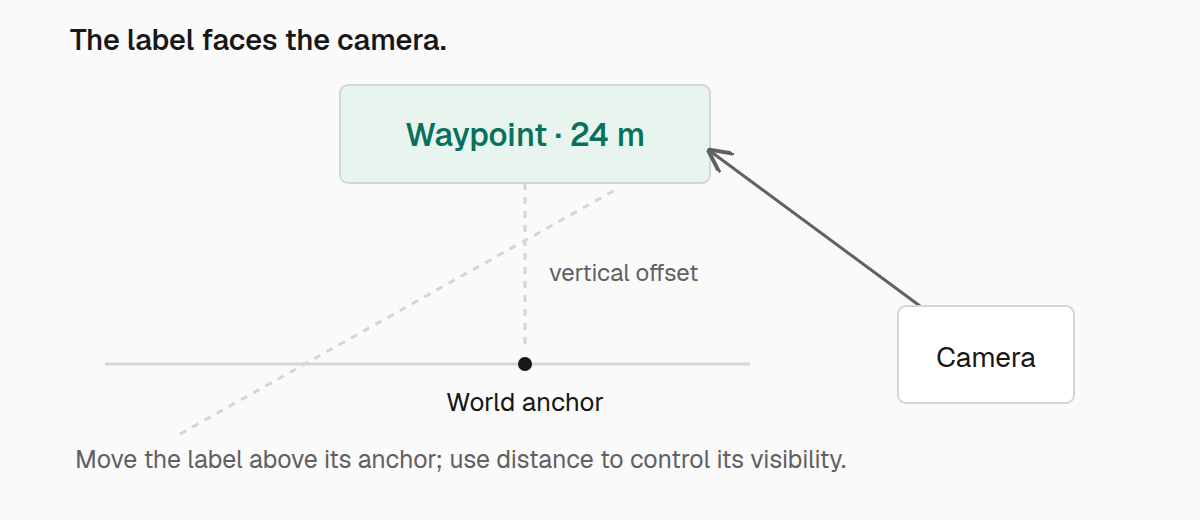
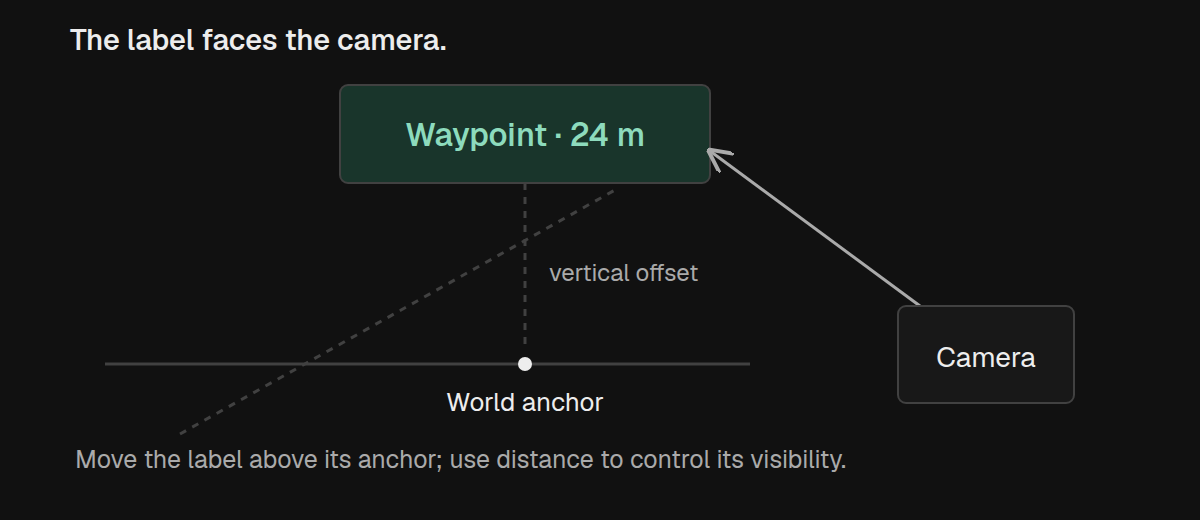
Show a floating notice
Suppose a player has just finished a task. Show a short message at the task's position:
import com.iamkaf.amber.api.billboard.v1.Billboard;
import com.iamkaf.amber.api.billboard.v1.Billboards;
import net.minecraft.network.chat.Component;

Billboard notice = Billboard.text(position, Component.literal("Complete!"), 0.02F)
        .forTicks(40);

Billboards.show(player, notice);
Here, position is a Vec3 in the player's current world, and player is the person who should see the message. Text faces the camera and is centered on that position. Its scale is measured in world blocks per font pixel: 0.02F makes a ten-pixel glyph about a fifth of a block tall.
forTicks(40) keeps the message visible for two seconds. Billboards use the client's presentation clock at 20 ticks per second, so their motion and lifetime are independent of server tick rate. Without an explicit duration, they last five seconds.
You can call Billboards.show with a server player from common gameplay code. Amber sends that player a packet. From client code, pass the current local player to show it immediately. A billboard belongs to one viewer; showing it to several players requires a call for each player.
Give the notice some motion
Let the message rise gently and fade as it disappears:
import com.iamkaf.amber.api.billboard.v1.BillboardAnimation;

Billboard notice = Billboard.text(position, Component.literal("Complete!"), 0.02F)
        .forTicks(40)
        .translateBy(0.0D, 0.5D, 0.0D, BillboardAnimation.Easing.EASE_OUT_CUBIC)
        .fadeOut();

Billboards.show(player, notice);
The translation moves half a block upward over the message's lifetime. EASE_OUT_CUBIC makes that movement slow down near the end. The fade runs at the same time and, without an easing argument, progresses linearly.
Animation methods describe tracks across the whole lifetime, not steps in a sequence. Calling fadeIn().fadeOut() replaces the fade-in with a fade-out. Use one opacity track for a notice like this.
You can animate other properties alongside the movement:
scaleFromTo(0.8D, 1.0D, easing)grows from 80% to full size. Pass twoVec3values to stretch the axes independently.rotateBy(0.0D, 0.0D, 15.0D, easing)adds a local rotation in degrees.textColorTo(0xFFFFCC66, easing)changes the default text RGB. Colors already styled on individual components retain their own RGB.opacityFromTo(0.0F, 1.0F, easing)fades in. Opacity is a multiplier from zero to one.
Translation uses world axes; rotation and scale use the visual's local axes. The FromTo methods let you choose both endpoints. translateTo and rotateTo start at zero, while scaleTo starts at unit scale. Animated values compose with the base appearance set by withRotation, withScale, and withOpacity.
For timing, start with LINEAR or an EASE_OUT_ curve. Amber also provides EASE_IN_ and EASE_IN_OUT_ variants of sine, quad, cubic, back, bounce, and elastic curves. Back and elastic curves can overshoot their endpoints, so keep that in mind around walls or other nearby visuals.
A billboard is immutable. Each fluent method returns a new value. Chaining the calls, as above, keeps those changes together; calling notice.fadeOut() and discarding the result does not change notice.
Keep a waypoint until the task ends
A waypoint needs a different lifetime from a reward message. Give it a stable identity, keep it visible, and remove it when the destination is no longer relevant:
import java.util.UUID;

UUID waypointId = UUID.randomUUID();
Billboard waypoint = Billboard.text(position, Component.literal("Meeting point"), 0.02F)
        .identifiedBy(waypointId)
        .persistent();

Billboards.show(player, waypoint);
Keep waypointId with the state that owns the waypoint. When the task finishes or is cancelled:
Billboards.hide(player, waypointId);Showing a new billboard with the same UUID replaces the old one. That is useful for changing a waypoint's label or appearance without leaving another marker behind. A replacement also starts its lifetime again.
Persistent billboards are cleared when the client's world or player changes. They are not saved world data, so recreate any markers that should appear after a player rejoins.
By default, walls hide the waypoint. Add .visibleThroughWalls() if the marker should help the player navigate through obstructed terrain. Keep ordinary world labels depth-tested so they stay attached visually to their surroundings.
Persistent billboards cannot use lifetime animation, because they have no end over which to sample it. Use the live transitions below when a persistent marker needs to move or change size.
Move an existing waypoint
If the destination changes, move the visible marker by its UUID:
Billboards.moveOverTicks(player, waypointId, destination, 10,
        BillboardAnimation.Easing.EASE_OUT_CUBIC);
destination is an absolute world position. The marker travels there over half a second. A second move during that journey starts from its current displayed position, so it does not jump back to the original point.
Use Billboards.move(player, waypointId, destination) for an immediate change. scaleOverTicks works the same way for size:
Billboards.scaleOverTicks(player, waypointId, 1.5D, 10,
        BillboardAnimation.Easing.EASE_OUT_CUBIC);
This changes the base transform scale to 150%. You can pass a Vec3 instead for independent axis scales, or use Billboards.scale for an immediate change. Live operations also accept the original Billboard in place of its UUID.
These operations update an existing visual. They do not create a missing billboard or extend its lifetime. If a bounded visual already has animation, its lifetime translation remains an offset on top of the moving anchor, and its lifetime scale remains a multiplier on the base scale.
Follow an entity
For a label above a creature, bind the billboard to the creature rather than updating its position every tick:
import net.minecraft.world.phys.Vec3;

Billboard label = Billboard.text(position, Component.literal("Follow me"), 0.02F)
        .boundTo(entity, new Vec3(0.0D, 2.0D, 0.0D))
        .forTicks(100);

Billboards.show(player, label);
The label follows the entity's interpolated position with a two-block upward offset. The offset stays aligned to world axes; it does not turn with the entity.
You can also transfer an existing marker to an entity with Billboards.bind(player, waypointId, entity, offset), or use bindOverTicks with a duration and easing curve to make that transfer gradual. BillboardAnchor.world(position) and BillboardAnchor.entity(entity, offset) let you describe either kind of anchor explicitly when choosing between them in your own code.
An entity-bound visual is hidden while the player's client does not track that entity. Its lifetime keeps running, so a short-lived label can expire while the entity is out of range.
Use a texture or model
Text is only one content option. The factory determines how the visual faces the world:
| Factory | Use it for |
|---|---|
Billboard.texture(position, texture, width, height) | A camera-facing PNG, with width and height in world blocks. |
Billboard.item(position, item, scale) | A camera-facing default item model. |
Billboard.itemObject(position, item, scale) | An item model that keeps its world orientation, using the dropped-item transform. |
Billboard.blockObject(position, block, scale) | A world-oriented block item model. |
A texture identifier points to a resource such as example:textures/billboards/notice.png. Item and block factories take registered objects and render their default item models; they do not take an ItemStack or an arbitrary block state. A block must have an item model.
All of these support the same identity, lifetime, movement, scale, rotation, and opacity operations as text. The text-specific color and opacity methods require text content.
Dimensions and content scale must be positive. Transform scales can reach zero, and opacity stays between zero and one. Positions, scales, and rotations must contain finite values.
When a visual does not appear
Check the viewer and anchor first. Client-side calls must target the current local player, and an entity anchor needs an entity that client is tracking. A wall may also be hiding a depth-tested visual.
Billboards operations return a BillboardDispatch: IMMEDIATE means the call was routed locally, CLIENTBOUND_PACKET means it was sent to the server player's client, and IGNORED means that server player has disconnected or been removed. This reports how the operation was routed, not whether a frame containing the visual was rendered.
Keep marker counts small and hide persistent markers when their purpose ends. The client warns at 12,288 active billboards and stops accepting new identities at 16,384; replacements still work at the limit. Those limits protect the client from runaway effects and are not targets to design toward.
For custom animation data, BillboardAnimation exposes composable track records and sampling methods. The billboard API source contains the full set of constructors and overloads.