
Mod diagnostics
Give players a useful diagnostic report through Amber Doctor.
A player says a feature isn't working. Before asking for a log, it helps to answer a few simple questions: is the feature enabled, does the server know about the player, and can their client receive the feature's packets?
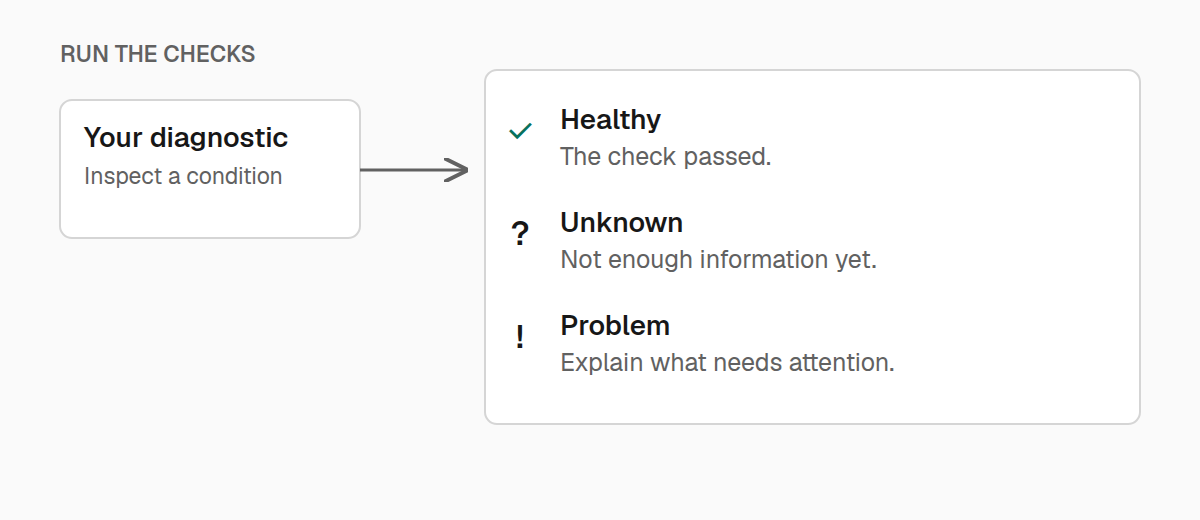
Doctor lets your mod contribute those answers to /amber doctor. Each check has a label, a result, and an explanation. A problem can also include a suggested next step.
Start with one useful check
Let's check whether the player can receive the optional notifications from the networking guide. Register this contributor during common initialization, after creating ExampleMod.MOD_INFO and registering the channel's packets:
import com.iamkaf.amber.api.doctor.v1.Doctor;
import com.iamkaf.amber.api.doctor.v1.DoctorStatus;
import com.iamkaf.amber.api.networking.v1.PeerAvailability;
import net.minecraft.network.chat.Component;

Doctor.registerServer(ExampleMod.MOD_INFO, (context, section) -> {
    if (context.player().isEmpty()) {
        section.check(
                "notifications",
                Component.literal("Notifications"),
                DoctorStatus.UNKNOWN,
                Component.literal("Select a player to check their connection.")
        );
        return;
    }

    var availability = ModNetworking.CHANNEL.playerAvailability(context.player().get());
    section.check(
            "notifications",
            Component.literal("Notifications"),
            availability == PeerAvailability.SUPPORTED
                    ? DoctorStatus.OK : DoctorStatus.UNKNOWN,
            Component.literal(availability == PeerAvailability.SUPPORTED
                    ? "This player can receive notifications."
                    : "Notification support has not been confirmed for this player.")
    );
});
The callback runs when someone requests a report. Its context supplies the current server and an optional player; section collects this invocation's results. Read current state here so the report reflects what's happening now.
A console invocation may have no player, which is why the example reports UNKNOWN instead of assuming an error. Likewise, an unconfirmed network connection isn't enough evidence to call the feature broken.
Use one contributor per mod on each side. As the mod grows, have that contributor call small methods for configuration, connections, or other features.
Choose a result that says something
Use OK when a check established that the condition is healthy. Use UNKNOWN when there isn't enough information to decide. WARNING means something deserves attention, while ERROR means a failure prevents the expected behavior.
The section's overall result reflects its most severe check. An unknown check keeps it from appearing completely healthy. Descriptive information alone also doesn't establish health.
section.information(key, label, value) is useful for facts such as a selected mode or the location of a configuration file. Reserve check for a condition you actually evaluated.
Keys such as notifications identify entries within your contributor. Keep them stable and unique. Labels and explanations are what the player reads; use your mod's translation keys there when preparing a feature for release.
Offer a next step
A good error says what someone can do about it. The longer check overload accepts an optional remedy:
import com.iamkaf.amber.api.doctor.v1.DoctorSection;
import com.iamkaf.amber.api.doctor.v1.DoctorStatus;
import net.minecraft.network.chat.Component;
import java.util.Optional;

public final class ConfigurationReport {
    private ConfigurationReport() {}

    public static void report(DoctorSection section, boolean loaded) {
        section.check(
                "configuration",
                Component.literal("Configuration"),
                loaded ? DoctorStatus.OK : DoctorStatus.ERROR,
                Component.literal(loaded
                        ? "Settings loaded successfully."
                        : "The settings file could not be read."),
                loaded ? Optional.empty() : Optional.of(Component.literal(
                        "Check the log for the invalid setting, fix it, and restart the game."))
        );
    }
}
Pass the result your configuration loader already recorded. A diagnostic should explain a failure, not retry loading files or silently repair gameplay state.
Add client checks
A server cannot inspect a client's HUD or screen state. Register those checks from client initialization with ClientDoctor.register:
import com.iamkaf.amber.api.doctor.v1.ClientDoctor;
import com.iamkaf.amber.api.doctor.v1.DoctorStatus;
import net.minecraft.network.chat.Component;

ClientDoctor.register(ExampleMod.MOD_INFO, (context, section) -> {
    section.check(
            "world",
            Component.literal("Client world"),
            context.client().level != null ? DoctorStatus.OK : DoctorStatus.UNKNOWN,
            Component.literal(context.client().level != null
                    ? "A world is loaded."
                    : "Join a world before checking in-game features.")
    );
});
Keep this in a client-only class. Its context exposes the current Minecraft instance, so you can inspect the same state your client feature uses.
Read the report
In the client, /amber doctor runs local checks. /amber doctor server requests the server report for your player. An administrator can use /amber doctor server <player> to select someone else.
In the server console, amber doctor runs server checks without a player context. Supply a player with amber doctor server <player> when a check needs one. Client and server reports answer different questions; looking at both is useful for a multiplayer feature.
/amber on the server prints Amber's installed name and version.
Keep checks quick and read-only
Contributors run on the relevant game thread. Read information that's already available, avoid long scans or file access, and don't send packets or change gameplay from the callback.
Each section can contain up to 64 entries. Entry keys must be nonempty, unique, and at most 128 characters long. If a contributor fails, Doctor reports that failure and continues with the other mods.
For your own diagnostic screen, Doctor.inspectServer and ClientDoctor.inspect return the same reports without printing them. Call them on the corresponding game thread. Each report includes the mod's information, its overall status, and its entries; each entry carries its label, explanation, optional status, and optional remedy.