
Server management
Refresh, run, update, inspect, and stop a Pastel server.
Use the console while the server runs, and stop it before changing pack files.
Everyday commands
| Command | Purpose |
|---|---|
pastel | Show the installed pack, server state, and available update. |
pastel refresh | Reconcile the server with its current pack pin. |
pastel refresh -dry-run | Preview indexed file changes and pruning. |
pastel update | Select and install another Modrinth or Maven pack version. |
pastel run | Refresh when enabled, then start in the background. |
pastel run -f | Keep the Minecraft process attached to the terminal. |
pastel console | Follow the live log and send server commands. |
pastel stop | Save and stop Minecraft, escalating if necessary. |
pastel status | Show detailed state for the current server directory. |
pastel self-update | Download and verify the latest Pastel release. |
pastel version | Print the installed Pastel version. |
sync remains an alias for refresh, and upgrade remains an alias for
update. Use ./pastel when the executable is in the current directory, or
.\pastel.exe in PowerShell.
Server commands find server.pastel in the current directory or a parent.
Use -config /path/to/server.pastel after the command to select another server.
Run pastel help for an overview or pastel <command> -h for its options.
Refresh the installed pack
A version-specific reference reapplies that version. A versionless Modrinth reference resolves the latest release again, so refresh can update its contents. Pin a version if you want updates to happen only when you choose them.
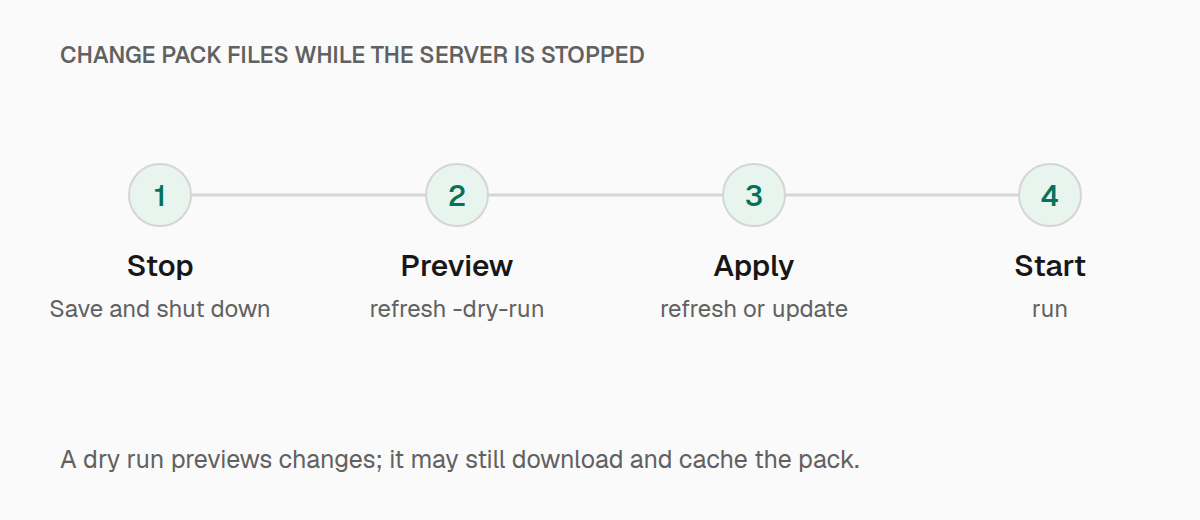
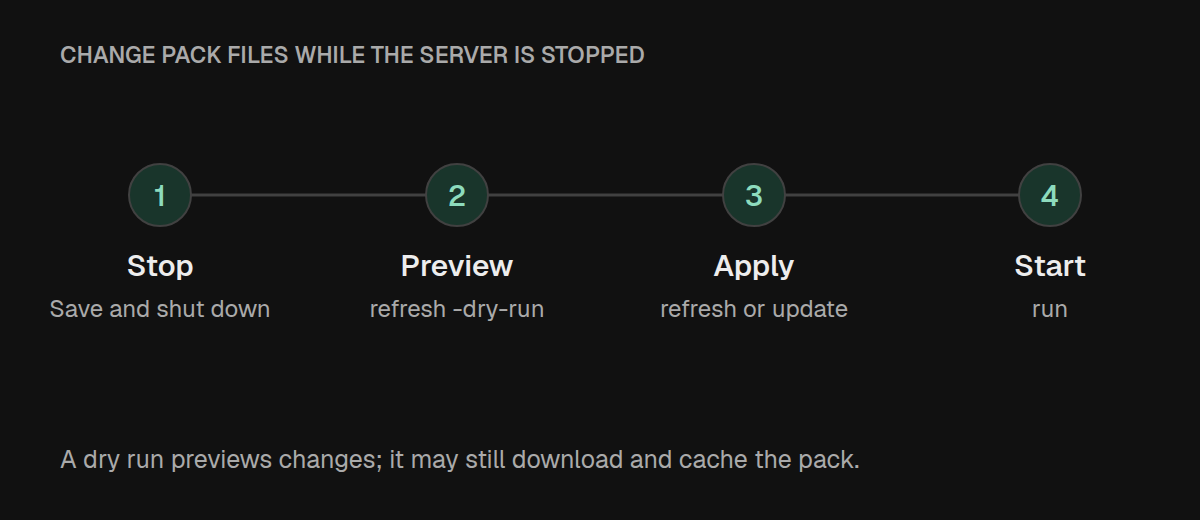
Stop the server first; refresh and update refuse to proceed while it is
running, including preview commands.
./pastel stop
./pastel refresh -dry-run
./pastel refresh
A refresh:
- selects
.mrpackentries whose server environment is notunsupported; - verifies each download with the strongest supported hash in the pack;
- applies
overrides/, followed byserver-overrides/; - prepares the loader launcher; and
- prunes extra top-level jars from
mods/and stale managed root launcher jars.
Override mod jars are included in the managed set. Nested mods/ directories and
non-jar files are not pruned, and mod pruning is skipped when the pack declares no
managed mods. Refresh does not remove every old configuration file.
A dry run does not apply pack files or install the loader. It can download and cache the pack while resolving it, and it reports overrides as a group rather than listing each replacement. Launcher-pruning predictions can differ from a real refresh because the loader is not prepared during the preview.
Use -no-prune when you deliberately maintain additional jars under mods/.
It also skips root-launcher pruning, but does not stop indexed files or overrides
from replacing files at the same path. For local debugging, setting
sync_on_run = false prevents run from restoring pack files; an explicit
refresh still reconciles them.
Keep a backup of your world and local settings before changing packs. Pastel
rejects indexed files under world/, but that check does not cover override
contents or a custom world directory.
Update the pack pin
Stop the server, preview the update, then apply it:
./pastel stop
./pastel update -dry-run
./pastel update
Use -to <version> to select a version without the interactive picker and
-yes to skip confirmation in an automated workflow. Updates work for Modrinth
pins and Maven coordinates. Use install when changing to a different pack or
when the current reference is a direct URL or local path.
For an unattended update, provide both the target and confirmation flag:
./pastel update -to 1.2.0 -yes-dry-run shows the selected version change without updating the pin or applying
pack files; it is not a per-file diff. Updates can change the Minecraft version
or be downgrades, so check the selected target before confirming. If an update
fails after the pin was written, correct the problem and use refresh to finish
applying that version.
Fabric launchers are aligned with the pack's declared versions. In Pastel 0.1.7, Forge and NeoForge can reuse an existing server argument file even when the pack declares a different loader version. For a loader or Minecraft version change, prepare and test a fresh server directory before moving your saved world and settings.
Update Pastel
./pastel self-update
./pastel version
self-update downloads the latest GitHub release for your operating system and
architecture, verifies its archive against SHA256SUMS, and replaces the
executable you ran. It accepts no version or other arguments and needs write
access to the executable's directory. It does not update the modpack or restart
an existing server; stop and start the server to use the new supervisor version.
Use the installer or manual download for a specific
Pastel release.
Background supervision
After a background server reaches Minecraft's ready state, Pastel restarts it
five seconds after an unexpected non-zero exit when auto_restart = true.
Pastel does not restart:
- a clean shutdown;
- a server stopped through
pastel stopor thestopconsole command; - a process that failed before reaching the ready state; or
- a foreground server started with
pastel run -f.
This prevents invalid packs and startup failures from entering restart loops.
Set auto_restart = false when systemd, Docker, or another process manager owns
restart policy.
Console and shutdown
On macOS, Linux, or Windows, attach to a background server with:
./pastel consolePastel follows the current log and forwards input to the Minecraft console.
Press Ctrl+C or Ctrl+D to leave the attached console while the background
server keeps running. Type stop to shut down Minecraft.
From another terminal, pastel stop sends the same shutdown command, waits up
to 30 seconds, then escalates if needed. pastel stop -force skips the graceful
Minecraft shutdown and proceeds to process termination. In foreground mode,
Ctrl+C stops the server instead of detaching.
Background run shows startup progress. In an interactive terminal, press
Enter to leave that view while the server continues starting.
If a deleted server directory leaves processes behind on Linux,
stop -orphans stops all Minecraft processes it identifies as orphaned.
stop -pid terminates the specified process directly; it does not send a
Minecraft save command:
./pastel stop -orphans
./pastel stop -pid <process-id>
Command options
Options belong after the command; they are not all global flags.
| Command | Options |
|---|---|
install | -memory, -repo, -dir, -version, -no-refresh, -yes |
refresh | -config, -root, -v, -dry-run, -no-prune, -prune=false |
update | -config, -v, -to, -yes, -dry-run, -no-prune |
run | -config, -v, -f or -foreground, -no-prune |
console, status, home | -config, -root, -v |
stop | -config, -force, -pid, -orphans |
self-update | None |
-root overrides the server directory for that invocation. -v enables verbose
output where available. Set runtime memory in server.pastel; run does not
accept -memory.