
Configuration
Configure pack resolution, Java, memory, synchronization, and runtime behavior.
Pastel keeps each server's settings in server.pastel. A generated file starts
with the settings most server owners need:
pack = "modrinth:aristea"
memory = "4G"
sync_on_run = true
auto_restart = true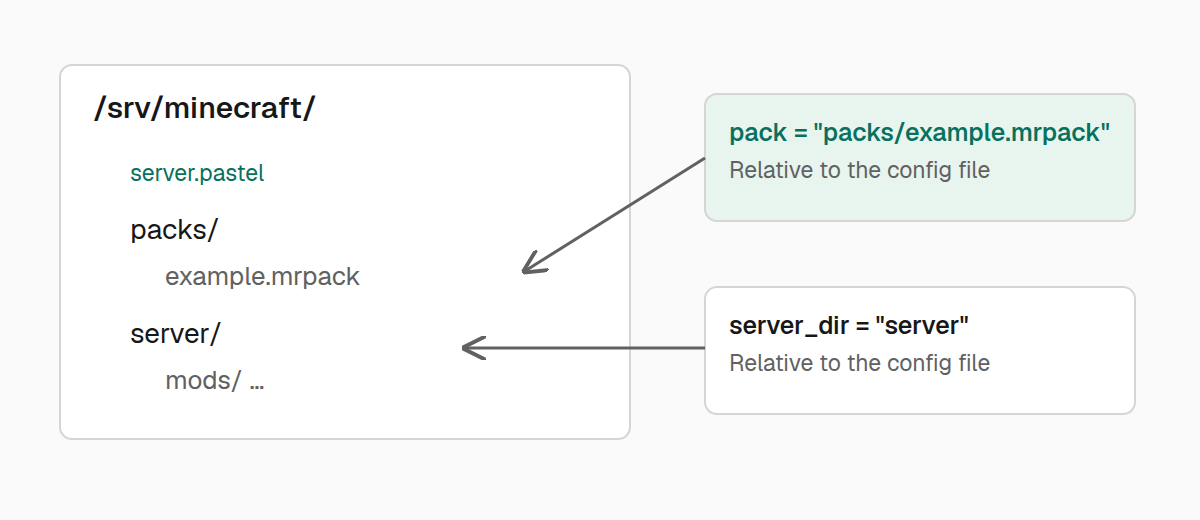
Settings
| Key | Default | Purpose |
|---|---|---|
pack | Required | Modrinth pin, .mrpack URL or path, unpacked pack directory, or Maven coordinate. |
memory | "4G" | Maximum Java heap, with or without the -Xmx prefix. |
sync_on_run | true | Refresh pack files before starting the server. |
auto_restart | true | Restart a ready background server after an unexpected crash. |
repositories | None | Ordered Maven repository bases for resolving coordinates. |
java | Automatic | Java executable override. |
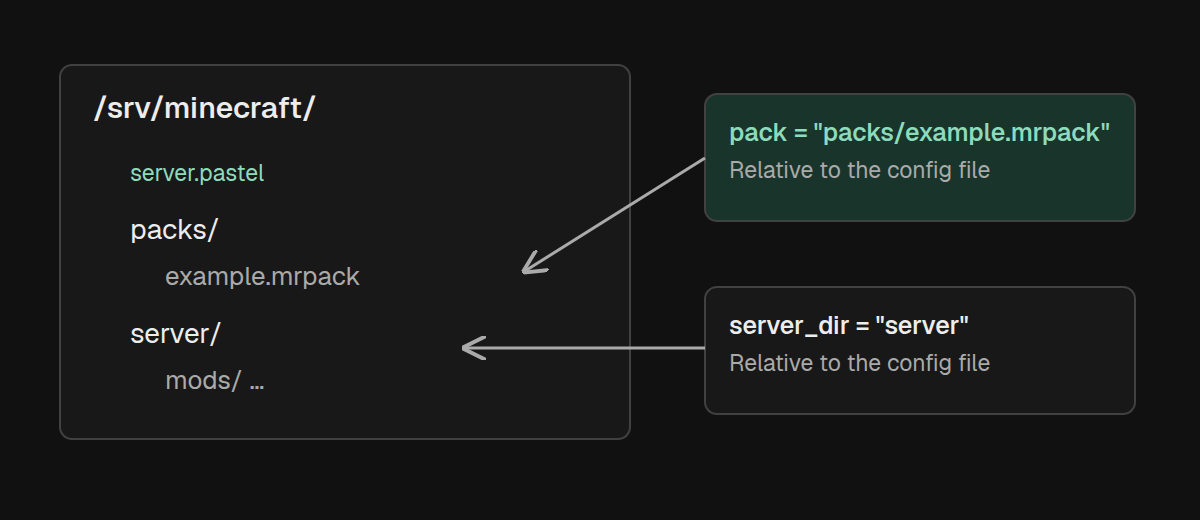
server_dir | Configuration directory | Server directory relative to server.pastel, or an absolute path. |
extra_java_args | None | Additional arguments placed before the Minecraft launch target. |
nogui | true | Request launch without the Minecraft server GUI; see the limitation below. |
Relative pack paths and server_dir are resolved from the directory
containing server.pastel. Use an absolute path for java: it is passed to the
process launcher without being resolved relative to the configuration.
Server commands search the current directory and its parents for server.pastel,
or accept an explicit path after the command:
./pastel status -config /srv/minecraft/server.pastelinstall instead creates a configuration in the current directory or its -dir
target. When loading an older configuration without auto_restart, Pastel writes
auto_restart = true into the file.
In Pastel 0.1.7, nogui = false does not remove nogui from the normal
loader-generated launch command. Keep the default for a dedicated server.
A versionless Modrinth reference, such as the example above, tracks the latest
release whenever the pack is resolved. Use modrinth:aristea:0.1.4 to pin an
exact version and choose future changes with pastel update.
Maven packs
Maven coordinates require one or more explicit repositories:
pack = "com.example.modpacks:example-pack:1.2.0"
repositories = [
  "https://maven.example.com",
]
memory = "6G"
Repositories are tried in order. The first repository containing the artifact wins. Pastel does not provide a default Maven repository.
Choose Java explicitly
Leave java unset to let Pastel select a suitable system runtime or install a
managed Temurin JRE. To prefer an existing executable:
java = "/opt/jdk-25/bin/java"
extra_java_args = ["-XX:+UseG1GC"]
If the configured executable is missing, unusable, or too old, Pastel falls back
to a managed runtime. The override is a preference, not a strict requirement.
Forge and NeoForge installer runs select Java separately and do not use the
java setting.
Pastel uses these Java version floors:
| Minecraft version | Minimum Java |
|---|---|
| 26.1 and newer | Java 25 |
| 1.20.5 through 1.21.x | Java 21 |
| 1.17 through 1.20.4 | Java 17 |
| Older releases | Java 8 |
An empty or unrecognized Minecraft version normally falls back to Java 25. These
are Pastel's selection rules; individual packs can have stricter requirements.
For Forge and NeoForge, also check user_jvm_args.txt for conflicting memory or
JVM options.
Preserve local pack changes
Set sync_on_run = false while debugging a local mod or configuration change:
sync_on_run = falsepastel run will keep current pack files in place, although it still resolves
the pack and prepares its launcher. This can require network access. Run
pastel refresh explicitly when you are ready to restore the declared pack state.
Use pastel refresh -no-prune for a one-time refresh that leaves additional
jars under mods/ and skips stale root-launcher pruning. This does not protect
files that the pack directly replaces. run and update also accept -no-prune;
repeat it on later commands if you want to keep the extra jars.